更新时间:2025-09-23 22:30点击:84
JSON (JavaScript Object Notation) 是一种轻量级的数据交换格式。
如果你还不了解 JSON,可以先阅读我们的 JSON 教程。
Python3 中可以使用 json 模块来对 JSON 数据进行编解码,它包含了两个函数:
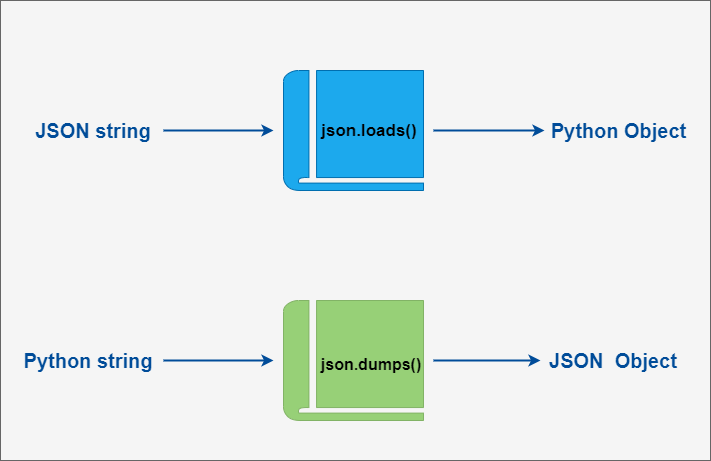
在 json 的编解码过程中,Python 的原始类型与 json 类型会相互转换,具体的转化对照如下:
| Python | JSON |
|---|---|
| dict | object |
| list, tuple | array |
| str | string |
| int, float, int- & float-derived Enums | number |
| True | true |
| False | false |
| None | null |
| JSON | Python |
|---|---|
| object | dict |
| array | list |
| string | str |
| number (int) | int |
| number (real) | float |
| true | True |
| false | False |
| null | None |
以下实例演示了 Python 数据结构转换为JSON:
执行以上代码输出结果为:
Python 原始数据: {'no': 1, 'name': 'Runoob', 'url': 'https://www.runoob.com'}
JSON 对象: {"no": 1, "name": "Runoob", "url": "https://www.runoob.com"}
通过输出的结果可以看出,简单类型通过编码后跟其原始的repr()输出结果非常相似。
接着以上实例,我们可以将一个JSON编码的字符串转换回一个Python数据结构:
执行以上代码输出结果为:
Python 原始数据: {'name': 'Runoob', 'no': 1, 'url': 'http://www.runoob.com'}
JSON 对象: {"name": "Runoob", "no": 1, "url": "http://www.runoob.com"}
data2['name']:  Runoob
data2['url']:  http://www.runoob.com
如果你要处理的是文件而不是字符串,你可以使用 json.dump() 和 json.load() 来编码和解码JSON数据。例如: